Chrome Extension
Keep Your Best Prompts Within Reach
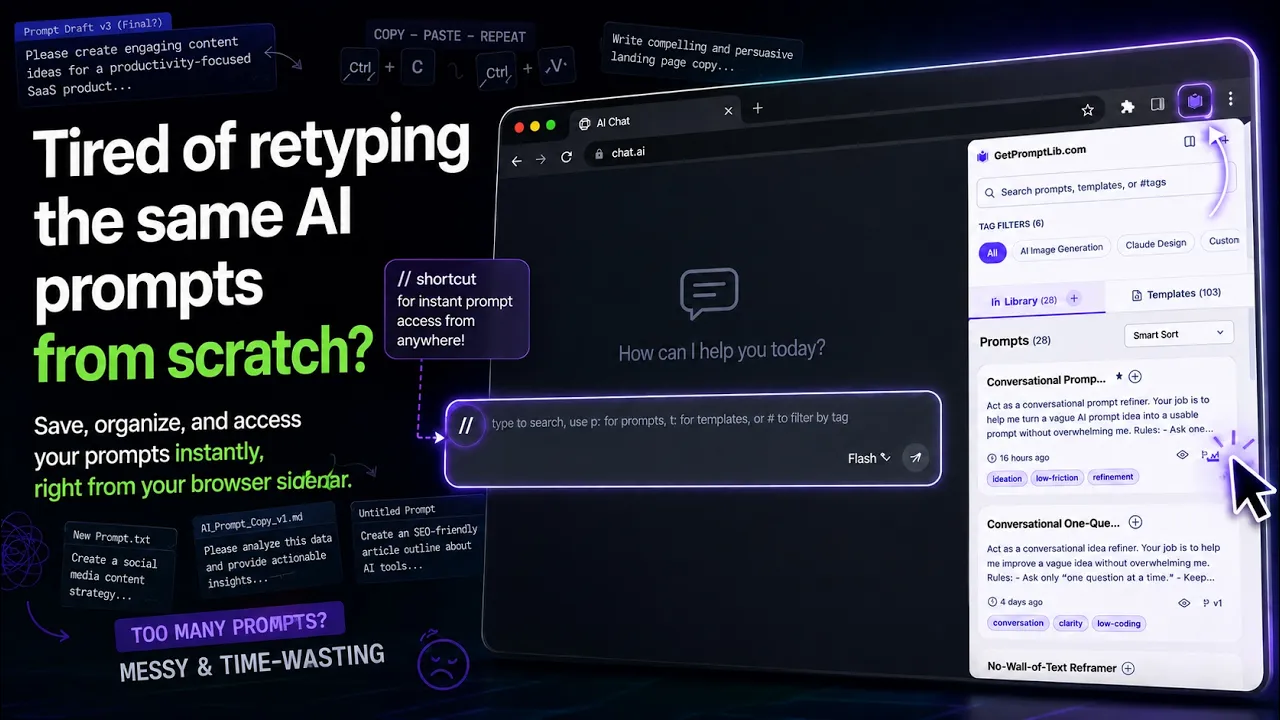
Save prompts, organize them with tags, and reuse them from a browser sidebar or your web dashboard.
Works on Chrome, Edge, Brave, and other Chromium browsers
Features
Everything You Need to Reuse Your Prompts
Stop losing good prompts in old tabs and chat history. Keep them in a library you can search, tag, reuse, and turn into repeatable workflows.
Premium
Quick Menu (// Trigger)
Type // (can be customized) in AI chat tools to open Quick Menu, search your library, and insert a saved prompt. Use p: for prompts, t: for templates, or h: to recall recently copied prompts.
Use case: Start typing, open Quick Menu, search for your prompt, and insert it where you are already writing.
Premium sync
Workflows
Chain prompts and templates into guided steps, then run the workflow from the sidebar with live prompt references and notes.
Use case: Build a launch checklist once, then run research, brief, draft, and review prompts step-by-step.
Save Prompts & Templates
Build your library from the side panel, or save selected text from the page and turn it into a prompt later.
Search & Filters
Search by keyword, narrow results with tags, and jump back to saved prompts without digging through old chats.
Manual Tags
Create your own tags and keep prompts organized in a way that matches how you actually work.
Keyboard Shortcuts
Open the extension faster and move through Quick Menu with keyboard-first controls when you want less mouse work.
Side Panel or Floating Panel
Choose the browser sidebar for library management or a floating panel when you want prompt access next to the page.
Use case: Use the sidebar to organize your library, then switch to the floating panel when you want it closer to your workflow.
Premium
Prompt Clipboard History
Use the h: filter in Quick Menu to recall recently inserted prompts and filled templates from the last 7 days.
Premium
Version History
Track changes to your prompts over time and restore an earlier version when an edit does not work out.
Premium
Import & Export
Export your user-created library to JSON on any plan — no lock-in. Import from JSON or CSV with column mapping and restore backups on the web dashboard with Premium.
Premium
Synced Access
Keep prompts, tags, and settings available through your signed-in account, with realtime sync across up to 3 active devices on premium.
Use case: Update a prompt on one premium browser, then pick up the latest version from another signed-in device or your dashboard.
How It Works
1
Install the Extension
Add GetPromptLib to Chrome, Edge, Brave, or another Chromium browser, then sign in with a free account.
2
Save What You Want to Reuse
Save prompts from the side panel or capture selected text from the page, then organize everything with tags.
3
Reuse From the Library
Open the sidebar anytime, or use Quick Menu in AI chat tools when you want faster insertion.
Simple pricing
Free or Premium. Nothing in between.
Start free with saved prompts and local workflows. Upgrade when you need Quick Menu, prompt clipboard history, unlimited workflows, version history, and realtime sync.
Free
For building a personal prompt library in Chromium-based browsers
$0forever
- Up to 10 saved prompts
- Unlimited tags
- Complimentary account backup
- Side panel prompt library
- 1 active device at a time
- Works on Chrome, Edge, and Brave
- 3 local workflows
- Local JSON export (in the extension)
- Quick Menu (// trigger) in AI chat tools
- Prompt clipboard history
- Version history
- Import & restore (JSON/CSV)
- Realtime sync across active devices
Most Popular
Premium
Unlimited prompts, faster reuse, and synced access across your devices
$4.9/month
or $19.9/year
Earlybird offer: use code EARLYBIRD at checkout.
- Unlimited prompts
- 300 MB synced storage
- Quick Menu (// trigger) in AI chat tools
- Prompt clipboard history
- Unlimited workflows + sync
- Full version history
- Realtime sync across up to 3 active devices
- Up to 3 active devices
- Import & restore (JSON/CSV)
- Premium library access
- Priority support
Questions about billing, plan limits, or refunds? Contact us
Frequently Asked Questions
Everything you need to know about GetPromptLib
Still have questions?
We are here to help. Reach out and we will get back to you within 24 hours.
Contact SupportYes. The free tier includes up to 10 saved prompts, unlimited tags, complimentary account backup for supported data, local JSON export, and 1 active device. Premium adds Quick Menu, version history, import/restore, 300 MB synced storage, and realtime sync across up to 3 active devices.
GetPromptLib works on Chrome, Edge, Brave, and other Chromium browsers. The web dashboard works in any browser, and extension-only features such as Quick Menu appear in AI chat tools.
Prompts are stored locally in the extension first. When you sign in, GetPromptLib may provide complimentary account backup for supported data, so synced items can be restored from your account. This free backup is a convenience, not a storage guarantee or replacement for exporting your own JSON backup. Premium adds realtime sync, version history, and 300 MB synced storage. We do not use your prompts as training data.
If you sign back into the same account, the extension can restore supported data that was already saved through complimentary account backup, subject to availability. Data that only lived locally in the extension is removed when the extension is uninstalled, so export JSON before reinstalling, switching devices, or resetting your browser. Premium adds realtime sync across up to 3 active devices.
Free accounts support 1 active device at a time. Premium supports up to 3 active devices with realtime sync between signed-in browsers. The web dashboard remains available through your account either way.
We will notify you when you are approaching the 10-prompt limit. You can upgrade to unlock unlimited prompts, or remove older prompts and templates to free space.
Yes. We offer a 14-day money-back guarantee. If Premium is not a fit, contact support within 14 days of your purchase.
Yes. Local JSON export is available on every plan from the extension, so you can back up your library anytime with no lock-in. Premium subscribers can also import and restore, and export their user-created prompts as JSON or CSV from the web dashboard under Prompts → Import / Export (a daily limit of 100 items applies). Note: prompts imported from the Public Library (free, Premium, or Exclusive collections) are excluded from exports to respect copyright.
Stop Rewriting the Same Prompts
Save once, reuse anywhere. Get started for free and build your prompt library in minutes.
Get Started FreeSecure & Private
Instant Setup
No credit card required